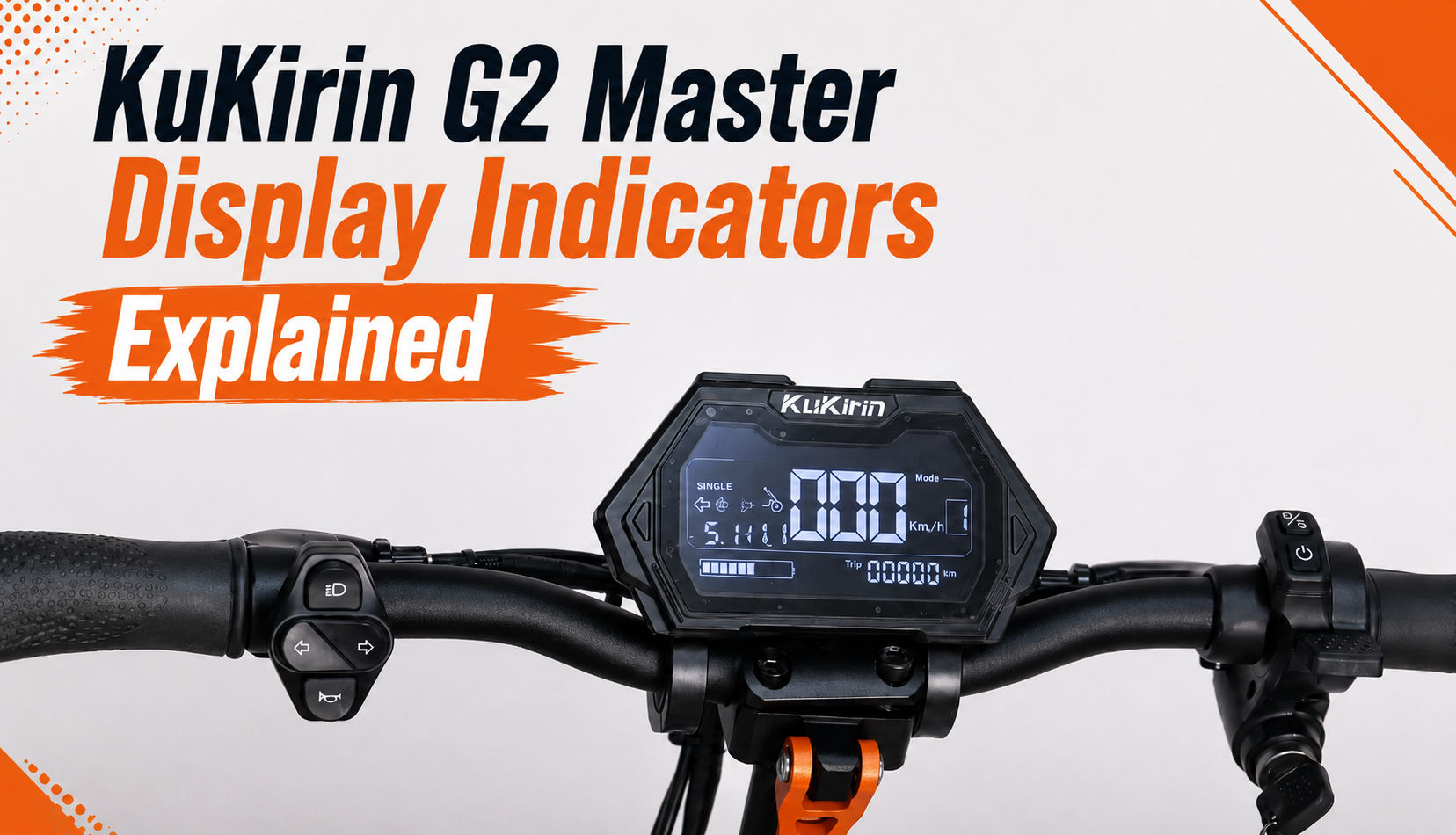
KuKirin G2 Master Display Indicators Explained
The KuKirin G2 Master display is the main interface between the Rider and the scooter. It provides essential information while riding, including speed, battery level, mileage, riding mode and the status of various functions.
The display also includes several indicators that allow you to quickly understand the current status of your scooter.
In this guide, we explain the different KuKirin G2 Master display indicators, what they mean, their functions and which warnings you should pay particular attention to.
What is the role of the KuKirin G2 Master display?
The display centralizes most of the information needed when using the KuKirin G2 Master.
While riding, it allows you to monitor your speed, remaining battery level, selected riding mode and mileage.
It also shows whether certain functions are active, including the turn signals, headlights, cruise control and Single or Dual Motor mode.
Some indicators also serve as warnings. They can alert you to an abnormally high temperature or appear alongside an error code when the scooter detects a problem.
KuKirin G2 Master display indicators: what do they mean?
Below are the different KuKirin G2 Master display indicators and their meanings. You can use the image below to identify each symbol on the display.
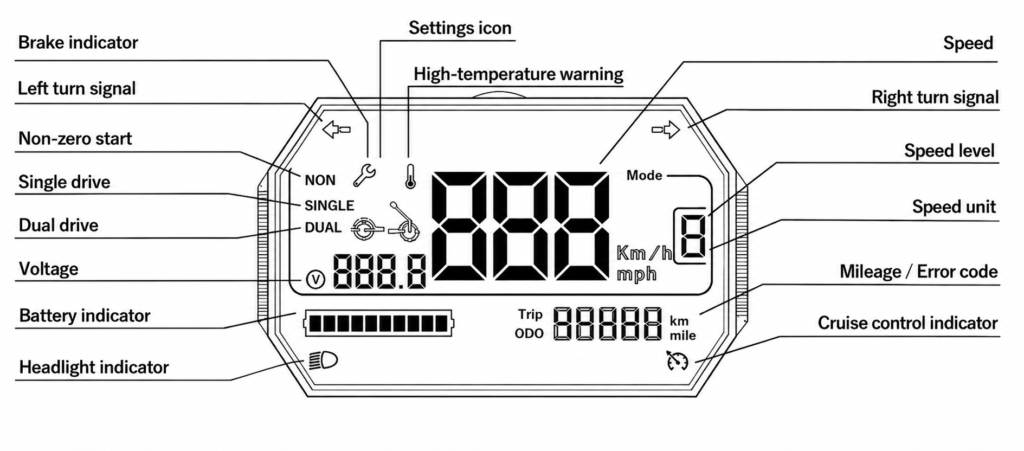
Brake indicator
The brake indicator appears when the braking system is activated.
It confirms that the display is correctly detecting the action of the brake levers.
Left turn signal
This indicator appears when the left turn signal is activated.
It allows you to quickly confirm that the scooter is signaling your intention to turn left.
Right turn signal
The right turn signal indicator works in the same way.
It appears on the display when the right turn signal is activated.
Non-zero start
This indicator shows the current starting configuration of the scooter and indicates that the non-zero start function is active.
Single drive
The SINGLE indicator means that the KuKirin G2 Master is currently operating with only one motor.
The second motor is therefore not being used.
Dual drive
The DUAL indicator confirms that both motors of the KuKirin G2 Master are activated.
The scooter can then use its dual-motor system to deliver more power.
Voltage
The display can show the current battery voltage.
This provides additional information about the battery alongside the standard battery level indicator.
Battery indicator
The battery indicator shows the remaining charge level.
This is one of the most important pieces of information to monitor during your rides, as it helps you anticipate when your KuKirin G2 Master needs to be recharged.
Headlight indicator
This indicator confirms that the scooter’s lights are switched on.
When riding at night or in reduced visibility, check the indicator before starting your journey.
NON icon
The NON icon provides information about the scooter’s starting configuration and indicates the status of the zero-start function.
SINGLE icon
The SINGLE icon confirms that the scooter is currently using only one motor.
DUAL icon
The DUAL icon confirms that both motors are activated.
It provides a quick way to check whether your KuKirin G2 Master is operating in dual-motor mode.
Settings icon
The Settings icon is associated with the display configuration menu.
It appears when accessing the different settings available on the scooter.
High-temperature warning
This is one of the most important warning indicators on the display.
The high-temperature icon indicates that the system is overheating. If it appears while riding, stop the scooter and allow it to cool down before continuing.
If the warning appears repeatedly, we recommend identifying the cause of the overheating before continuing to use the scooter normally.
E, S or R mode
The display also shows the currently selected riding mode: E, S or R.
This allows you to quickly identify which riding mode is being used.
km/h and mph
The KuKirin G2 Master display can show speed using two different units:
- km/h: kilometers per hour
- mph: miles per hour
The selected unit appears directly next to the speed.
Trip
The Trip function shows the distance traveled during a specific journey.
It can be useful for monitoring the distance covered during an individual ride.
ODO
ODO represents the scooter’s total recorded mileage.
This information is particularly useful for monitoring the overall use of your KuKirin G2 Master and planning maintenance according to mileage.
Speed
Your current speed is displayed numerically in the center of the screen.
It is naturally one of the most visible and frequently checked pieces of information while riding.
Speed level
The speed level indicates the currently selected power level.
It allows the Rider to quickly check the current configuration.
Speed unit
The display allows you to switch between km/h and mph.
You can therefore select the unit that best matches your preference or the standard used in your country.
Mileage / Error code
This area of the KuKirin G2 Master display has two functions.
During normal operation, it can show mileage information. If the scooter detects a problem, the same area may display an error code.
The error code can then help identify the component or system responsible for the malfunction.
Cruise control indicator
This indicator confirms that cruise control is active.
When the icon appears on the display, the cruise control function is currently operating.
What should you do if an unusual indicator appears?
Not every KuKirin G2 Master display indicator means there is a problem.
Most simply confirm that a function is active, such as the turn signals, headlights, Single/Dual Motor mode, cruise control or the selected riding mode.
However, some information requires more attention, particularly the high-temperature warning or the appearance of an error code.
If either appears, avoid ignoring the warning. Identify the cause before continuing to use the scooter normally.
KuKirin G2 Master display error codes
The KuKirin G2 Master display is not only used to show riding information. It also plays an important role in diagnosing problems.
When the scooter detects a malfunction, an error code may appear on the screen.
These codes can help identify problems involving different components and determine which checks or repairs may be necessary.
Link to our complete KuKirin G2 Master error codes and solutions guide.
When should you replace the KuKirin G2 Master display?
The KuKirin G2 Master display is an essential component because it provides access to riding information, status indicators and error codes.
If the screen no longer turns on, becomes difficult to read, displays incorrect information or develops another malfunction, replacement may be necessary.
Before ordering a new display, always check the version installed on your KuKirin G2 Master. Different display versions may exist depending on the model year and scooter configuration, so the reference and connectors should match your original equipment.
You can find the KuKirin G2 Master display below to directly replace a damaged or defective unit.


If you are unsure about compatibility, compare the reference and connectors on your existing display before ordering.
Understanding your KuKirin G2 Master display
Understanding the different KuKirin G2 Master display indicators makes it easier to monitor your scooter and quickly identify unusual information.
Battery level, speed, turn signals, headlights, Single or Dual Motor mode, temperature, mileage and error codes are all centralized on the display.
Getting familiar with these indicators can help you use your KuKirin G2 Master more effectively and identify potential problems earlier.
Leave a Reply